

From your brand
Bring your own posts, Reels, and currently available Stories into the same visual workflow as the rest of your customer content.
- Posts and Reels
- Current Stories
- Multiple connected accounts
Shoppable Instagram feed for Shopify
Bring selected brand and customer Instagram content into Superdesk, connect the Shopify products shown, and publish a curated gallery shoppers can explore without leaving your store.

 Classic Twill Cap$49.00
The short answer
A shoppable Instagram feed brings selected Instagram photos and videos onto your own storefront and connects the products shown to their Shopify product pages and cart. It turns social inspiration into a curated shopping surface your brand controls.
Collect
Connect the supported Instagram professional account and decide which brand and customer content deserves a place in your storefront story.
Bring your own posts, Reels, and currently available Stories into the same visual workflow as the rest of your customer content.

Discover customer content through account tags, mentions, and tracked hashtags, then secure permission before you publish it.
Instagram to storefront
Keep discovery, permission, product context, and publication in one deliberate workflow instead of moving links and screenshots between tools.
Authorize the Instagram professional account connected to your brand's Meta Business Page.
Review your own content together with customer tags, mentions, and the hashtags you track.
Send a reusable rights request and let Superdesk track supported approval responses for you.
Connect the Shopify products shown, approve the post, and place it in the right storefront gallery.
Hi! We love this post and would like to feature it in our store. Reply #yesmaisonnorth to approve.
Make every post useful
Tag the real Shopify products visible in each post. Shoppers can explore the look, choose an available variant, add it to cart, or continue to the full product page.
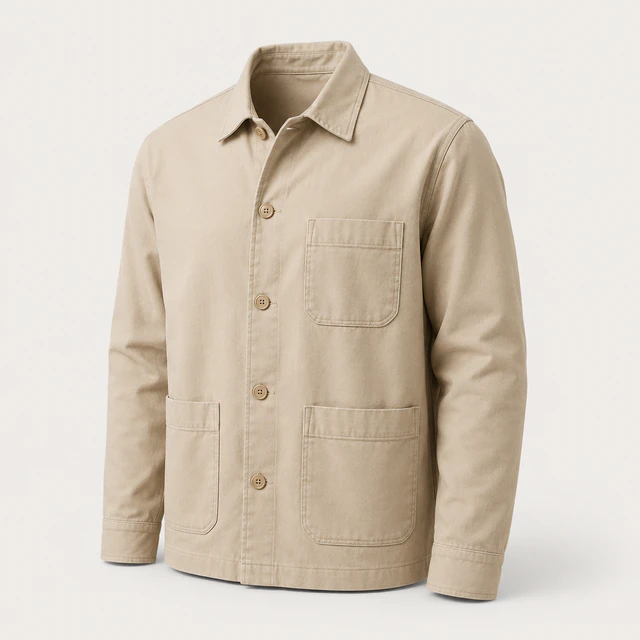
Lightweight cotton twill · relaxed fit
Connect every relevant item in a complete look instead of forcing one post to represent one SKU.
Show available variants, current product context, and a clear fallback to the complete product page.
The gallery lives inside the Shopify storefront—not on a social profile your shopper has to leave to visit.
Curate
A beautiful storefront gallery should reflect your merchandising strategy, not simply mirror whatever was posted most recently.
Publish only content that fits the brand, permission state, and shopping context.
Create useful groups for launches, seasons, creators, collections, or campaigns.
Include by source, label, or product; exclude what does not belong; and pin the posts that should lead.
 Approved
 Approved
 ApprovedHidden
Publish where it matters
Add the Superdesk gallery block to compatible Shopify theme templates and reuse one organized library in different merchandising contexts.

Introduce the community and the product world with a curated editorial selection.
Automatically show approved posts tagged with the Shopify product currently being viewed.
Build focused galleries for launches, categories, creators, and landing pages where the theme supports the app block.
Instagram + Reviews
Instagram is one source. Superdesk can also turn approved review photos and videos into reusable storefront content, so your social UGC and post-purchase proof share one library and one product context.
From a Shopify merchant
“Well designed and so intuitive to set up. Love how customizable the app is to match our branding.”
Shoppable Instagram FAQ
A shoppable Instagram feed displays selected Instagram photos and videos on an ecommerce storefront and connects the products shown to shopping actions. Superdesk lets Shopify merchants curate the content, tag products, and publish responsive on-site galleries.
No. Instagram Shopping is Meta's channel for tagging catalog products inside Instagram. Superdesk brings selected Instagram content onto your Shopify storefront and connects it to your Shopify products and cart.
You need a supported Instagram professional account—Business or Creator—connected through the required Meta business setup and permissions.
Yes. Superdesk brings supported tagged and mentioned posts into the Instagram inbox, alongside content from the hashtags you choose to track.
Choose the customer post, send your reusable permission request, and let Superdesk track supported creator responses and the resulting approval status. A guided fallback remains available when Meta does not permit an automated message path.
Yes. You can connect multiple Shopify products to one post and place hotspots on images so shoppers can understand which item is which.
Yes. Shoppers can select an available variant and add the product to their Shopify cart from the focused gallery view, or continue to the complete product page when they need more detail.
Yes. A dynamic product-page gallery automatically filters approved posts to content tagged with the Shopify product currently being viewed.
Superdesk supports responsive grid, masonry, and slider galleries, with presentation controls for desktop, tablet, and mobile.